
Nesting & Cut Path Software for Print & Sign Production
Fit more print jobs on every sheet and roll. Handle Jobs that exceed your printer’s limits.
Print more jobs on every sheet and roll with True Shape Nesting
Want to fit as many print jobs as possible on every sheet or roll to maximise media efficiency, cut costs and minimise waste? Doing it manually is slow, error-prone and rarely perfect.
Even many “automated” tools waste space because they only arrange rectangular boxes.
Reduce waste by up to 50%
Prepare jobs 2–3× faster
Reduce errors with consistent cut paths
Increase throughput without extra staff or machines
Combine multiple jobs
in one go
With Griffin, you don’t have to treat every job separately. Different designs, whether for one customer or several, can be combined automatically on the same sheet or roll.
This saves media, reduces setup time and lets you handle more work with the same resources.
Get perfect cuts every time with Automatic Cut Path Generation & Editing
A layout isn’t finished until it’s cut. Missing or inaccurate cut paths can stall production and lead to expensive reprints.
Griffin takes that risk away. It automatically generates precise cut paths around your artwork, even if no dieline is provided, using smart image tracing and fast previews. And if you need to make adjustments, simple editing tools let you mirror, scale or fine-tune paths in seconds.
On top of that, Griffin adds the marks your cutters rely on: camera, registration, border and grommets. It even supports double-sided work with turn-and-tumble layouts.
The result: fewer mistakes, perfect alignment and print-to-cut workflows you can trust.

Send jobs straight to any printer or cutter
Once your layouts and cut paths are ready, Griffin makes sure they run flawlessly on the hardware you already own. It exports in industry-standard formats like PDF and DXF, optimised for faster RIP processing and shorter turnaround times.
Griffin integrates with a wide range of RIPs, printers and cutters – including Zünd, Kongsberg, Summa, Mimaki and Onyx – so you’re never locked into a single vendor. Out-of-the-box support includes Zünd Cut Center for direct integration.
It also generates the production marks your workflow depends on: barcodes, text, job IDs and more. Keeping every job accurate, traceable and error-free.
The result: seamless output for flatbed, roll-to-roll, laser and router cutters. Griffin adapts to your setup, not the other way around. It maximises the efficiency and the value of your hardware investments.


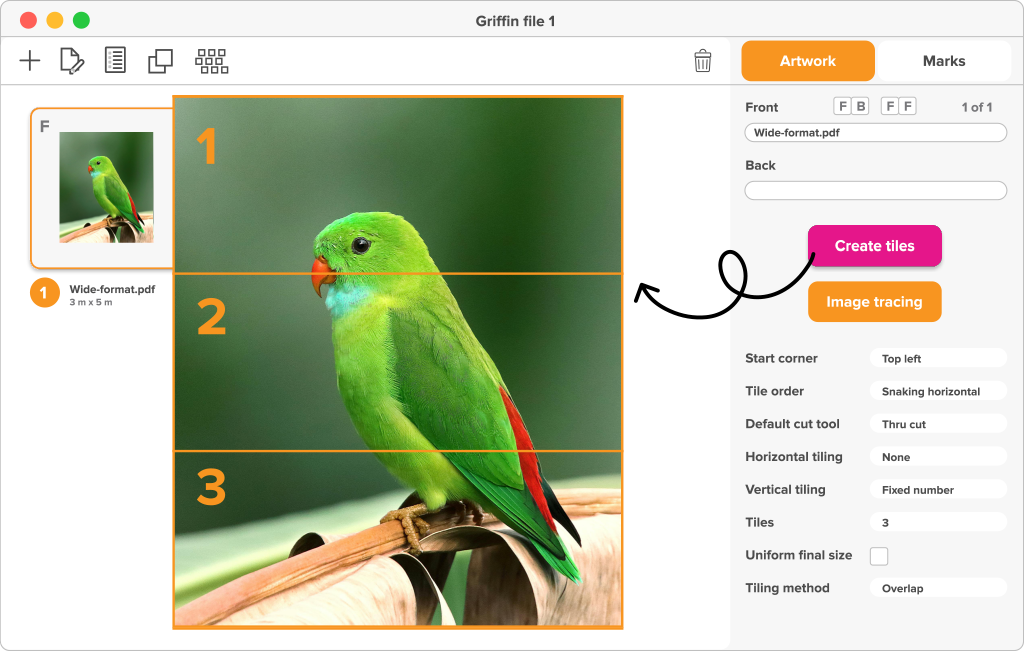
Tile oversized artwork with automatic Tiling and Layout management
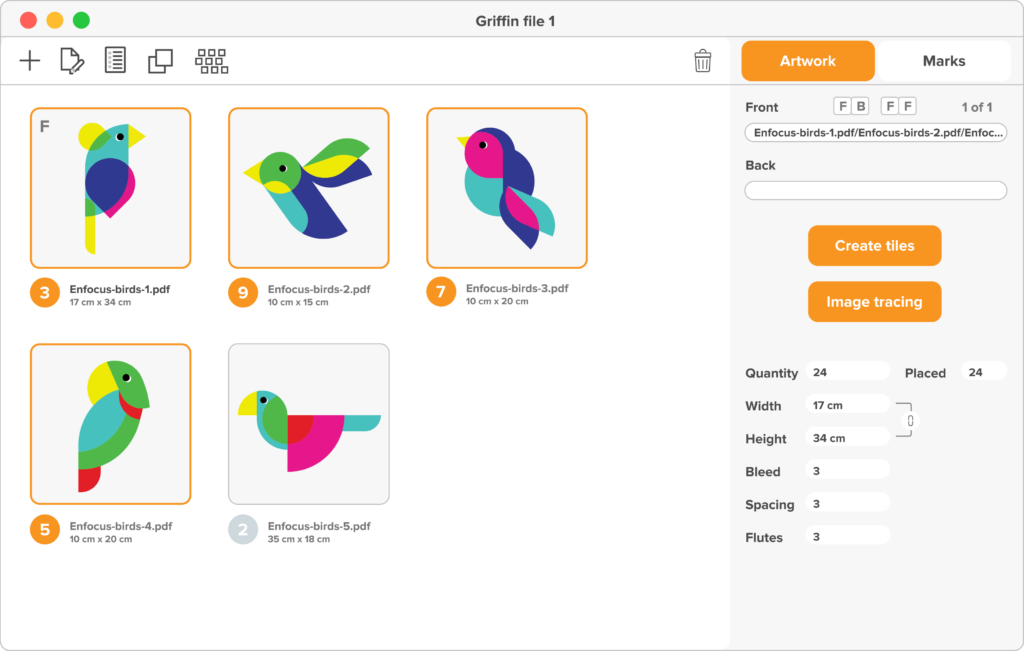
With drag-and-drop control, clear previews and smart defaults for common materials, operators can go from file import to production-ready output in just a few clicks.
New users get up to speed quickly with built-in guidance and documentation, while visual controls make it easy to see nesting tightness, orientation and layout previews before committing.
Running on both Windows and Mac, Griffin keeps setup simple and lets your team focus on getting jobs out the door, not fighting with software.
Griffin modalities: Desktop & Auto.
Griffin comes in two versions, both powered by the same advanced nesting engine. Desktop for operators, Auto for automation.
Whether you prefer manual control or full automation, Griffin adapts to the way your business runs.

Desktop
A standalone application with an intuitive drag-and-drop interface, perfect for operators who want visual control over their layouts.
Auto
A REST API for high-volume environments. Integrated with Enfocus Switch and other systems, it processes jobs hands-off for true end-to-end automation.

Griffin Bundle
A combination of both Desktop and Auto versions of Griffin

Griffin+
Griffin+ up to 500 artworks.
Griffin+ up to 50m length
And on top of that, you get tiling reports and project-level reports with detailed layout information.
Scale your production with
hands-off automation using Griffin Auto
Want to automate the handling of incoming jobs? Griffin can also run as a REST API, built specifically for wide-format workflows that run around the clock. Jobs arrive, are nested, preflighted and sent to the RIP without human intervention. Driven by Enfocus Switch, it becomes part of a fully automated production line.
The result: enterprise-level scalability, hands-off operation and seamless integration with MIS/ERP systems. With 300+ configurable properties, Griffin gives you the flexibility to grow without adding staff. True end-to-end automation for wide-format production.
Good to know: this level of automation is available only in Griffin Auto. If you don’t need full automation, Griffin Desktop gives you powerful drag-and-drop control and visual layouts without complexity
How Griffin stands out from the competition
There are other nesting and tiling solutions on the market. – But most of them stop at simple rectangular layouts or lock you into a single hardware vendor. Griffin is different.
Why choose Griffin?
- True-Shape Nesting
Packs irregular shapes tightly, not just bounding boxes. - Hardware-neutral
Works with a wide range of printers, cutters and RIPs. So you’re never tied to one brand. - Complete workflow coverage
From nesting and tiling to cut-path generation, production marks and device-ready output. - Seamless integration
Connects with PitStop Pro for file corrections and with Enfocus Switch for end-to-end automation. - Easy to use
Intuitive interface with presets, templates and drag-and-drop control. Plus Griffin Auto for enterprise-level automation.
Griffin combines the power of advanced automation with the flexibility to fit into any wide-format workflow. Giving you more efficiency without forcing you to change the way you work.
Why print professionals choose Griffin
- Less waste, more throughput
True Shape Nesting and gang-run printing squeeze more out of every sheet or roll, cutting material costs by up to 50% and letting you run more jobs with the same resources. - Handle oversized jobs with ease
Automatic tiling takes care of banners, wall graphics and billboards. With overlaps and bleeds built in. - Complete workflow in one tool
Griffin covers the entire workflow: nesting, tiling, cut-path generation, and device-ready PDF/DXF output with all the marks your cutters and printers need. - Hardware independent
Works with virtually any RIP, printer or cutter – including Zünd, Kongsberg, Summa, Mimaki and more – so you’re never locked into one vendor. - Fits into your workflow
Easy-to-use desktop app for operators, enterprise-level automation with Griffin Auto, and seamless integration with PitStop Pro and Enfocus Switch. - Always improving
Regular updates add support for new devices, faster nesting and powerful new features. - ROI you can prove
Built-in reporting shows exactly how much time, material and money you’re saving.